DLTK's Bible Activities for Kids
The Story of Noah's Ark: Story Sequencing Cards
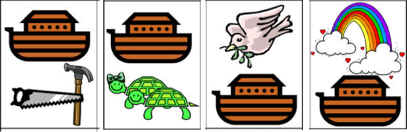 What is it?
Arrange a series of picture cards into the logical order to create the story from beginning to end.
This gives the children the chance to demonstrate and reinforce their recollection of the story.
(Click here for more story sequencing from DLTK's -- NOTE: not all are Bible Stories)
Activity Suggestions
1. Free Play
- Give the child the cards in a random pile.
- Allow them to arrange the cards in the order they want to to make up their own story.
2. Memory (Guided) Play
- Read the child the story of creation using our mini book or your own Bible (KJV).
- After the story is through, ask them to arrange the cards in the same order as in the story.
Template Instructions
Flash card type templates. You can use these in a variety of activities (see activity suggestions above).
- Print out the template of choice.
- Colour pieces, as necessary.
- OPTIONAL: Glue to a thin piece of cardboard (ex: old cereal boxes) and let dry (you can also laminate or cover with clear contact paper to make them last longer)
- Cut out the cards. This step may require adult assistance.
- OPTIONAL: You can glue a small piece of sandpaper or felt onto the back of the cards -- this will allow them to be used on a felt board.
Templates:
- Close the template window after printing to return to this screen.
- Set page margins to zero if you have trouble fitting the template on one page (FILE, PAGE SETUP or FILE, PRINTER SETUP in most browsers).
Sequencing Cards Template (color) or (B&W)
Printable version of this story