DLTK's Bible Crafts for Kids
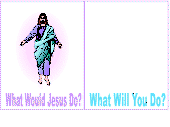 WWJD
(What Would Jesus Do)
WWJD
(What Would Jesus Do)
Contributed by
Materials:
- a printer,
- a piece of paper
- some crayons, paint, markers or pencil crayons,
- scissors,
Instructions
- Print out the template of choice (color or B&W).
- Colour (where appropriate)
- You can colour with sparkle glue if desired or use paint,
crayons markers or pastels. New mediums are always fun for kids.
- On template one, you'll notice a big blank space over the words
"What Will You Do?" You have a few choices with what to do with
this space:
- glue a small mirror to the template piece so people look at themselves when they view it (if you choose this option, you should put a thin piece of cardboard between the fold to make the template sturdier) - be forewarned - it isn't easy to glue the mirror to the paper, so reserve this option for older children
- glue a small square of tinfoil (reflective surface) shiny side out so it's mirror like
- glue a photo of the child onto the blank
- have the child draw a picture of themselves
- have the child draw a picture of themselves doing something nice (Ask them the question, What would you do? and have them answer it by drawing the picture on the template)
- have the child write a sentence or two about what they would do/what they did in a difficult situation
Templates:
- Close the template window after printing to return to this screen.
- Set page margins to zero if you have trouble fitting the template on one page (FILE, PAGE SETUP or FILE, PRINTER SETUP in most browsers).
Template (color) or (B&W)
Printable version of these instructions